Data Flow and Security in the WorkforceVision “Org Chart Drag & Drop” Power BI Visual
Overview
The WorkforceVision Org Chart Drag & Drop is a Microsoft-certified Power BI custom visual available through Microsoft Marketplace. Being a certified visual means it has passed Microsoft’s rigorous code reviews and security testing to ensure it meets strict privacy and quality standards.
Certified visuals do not send any data outside of Power BI. All data processed by this visual remains fully contained within your Power BI environment, whether in Power BI Desktop or the Power BI Service. WorkforceVision Ltd has no access to your data at any point.
Learn more on Microsoft Learn – Certified Custom Visuals.
Accessibility conformance for Org Chart Drag & Drop is summarized in the VPAT® 2.5 Rev EU (PDF).
Certified Custom Visuals and Data Handling
Power BI Certified visuals must comply with Microsoft’s strict no-external-communication and data isolation requirements.
Key Protections
- Verified No External Communication – Microsoft’s certification team inspects the visual’s source code to confirm it makes no outbound network calls. See Power BI Implementation Planning.
- No Vendor Servers or Backends – The visual runs entirely within Power BI. WorkforceVision operates no external service.
- Privacy and Security – Your data is protected under Microsoft’s platform-level security and compliance controls. Administrators can configure Power BI to allow certified visuals only in organisational workspaces.
Power BI’s Internal Data Handling and Visual Sandboxing
Power BI uses a sandboxed visual execution environment to isolate visuals and protect data.
How it works
- In-memory Data Model – All report data is loaded into Power BI’s internal data model, managed by the Power BI engine.
- Sandboxed Visual Execution – Each visual runs in a restricted iframe sandbox, preventing access to external services or local files. See Power BI Community: Visual Sandboxing.
- Controlled Data Binding – Only the fields bound to the visual are accessible to it. The visual cannot see other datasets or visuals.
The sandbox ensures the visual can only interact with Power BI via approved internal APIs, with no access to cookies, domains, or external requests.
Local Storage
If your Power BI tenant has enabled Local Storage (API v2), the visual may use it to preserve user edits.
How it works
- Stores user-driven modifications such as moved nodes, edited names, or added details.
- Each save only includes changed data, not the full dataset.
- Local storage is browser-isolated and cannot be accessed by other visuals or domains.
Retention Limits
- Expires automatically after 29 days of inactivity.
- Maximum size: 100 KB per visual instance.
This mechanism allows temporary retention of user edits without transmitting any data externally.
Data Residency and Vendor Access
Your organisational data remains entirely within the Microsoft Power BI environment. WorkforceVision Ltd has no operational access to your visuals, reports, or datasets.
Key Points
- No Data Leaves Your Environment – The visual makes no external calls and functions entirely client-side.
- Vendor Role Limited to Code Submission – WorkforceVision submits the visual package to Microsoft for certification and publication on Marketplace.
-
Data Residency
- In Power BI Service, all data remains in Microsoft Azure, following your tenant’s region.
- In Power BI Desktop, data stays on your local machine.
The only scenario in which WorkforceVision could view your data is if a user voluntarily exports and shares it for troubleshooting or support.
Data Flow Diagram (Description)
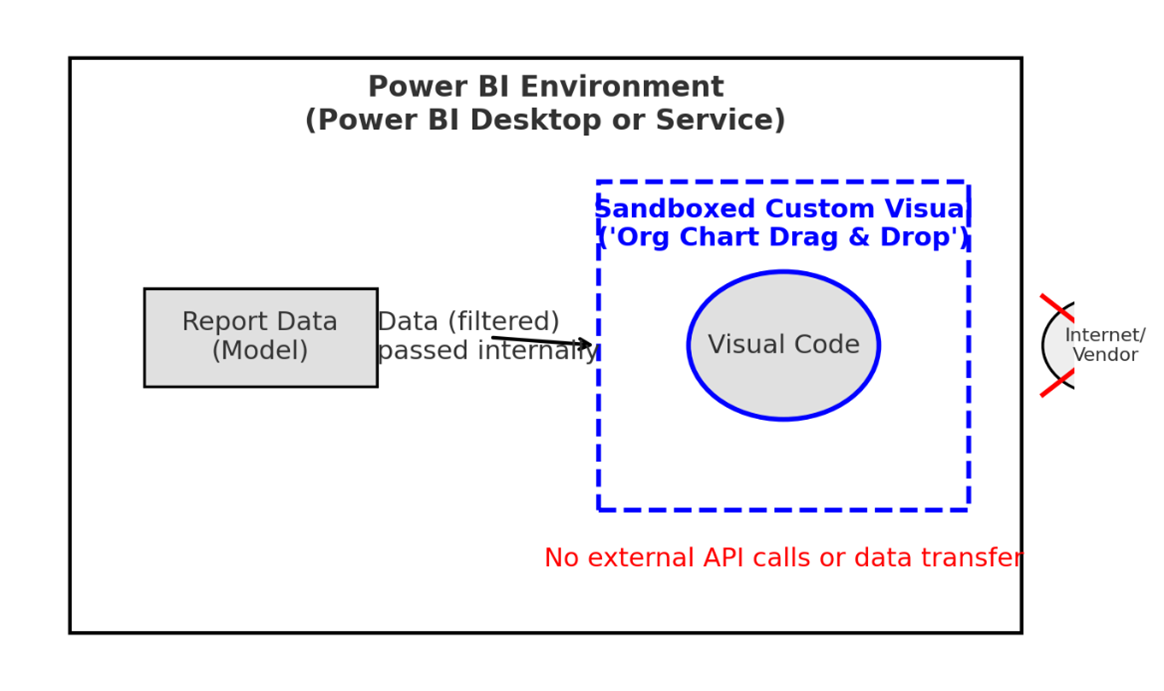
- All report data originates from the Power BI data model.
- Data is passed into the sandboxed iframe where the visual executes.
- The visual performs all operations locally within that sandbox.
- No outbound connections are established.
- Whether in Power BI Desktop or the Power BI Service, data remains securely within Microsoft’s infrastructure.